Wouldn't it be great if you could search your enterprise
data the same way you search the Internet? Most of us use
Internet search tools daily to look up movie times, search for
business addresses, shop, or just surf. Billions of pages of
unstructured data make up the Internet. Yet anyone with a Web
browser can enter a word or phrase and retrieve a ranked,
sorted result set, unlocking a vast range of information. IBM
is bringing the same searching capabilities to the enterprise,
with a new technology called OmniFind.
The Enterprise Challenge
The Internet was designed from the outset to link together
unstructured data in a huge web of interconnected hosts.
However, IT infrastructures at most companies were developed
without that clear vision. As a result, most companies today
face a plethora of nonintegrated information sources, from
relational databases to email, to Word documents, to HTML
pages. And, the information contained in these various sources
is expanding at an alarming rate.
Most firms are good at storing data but have problems
retrieving it. The proliferation of email, instant messages,
presentations, documents, and other unstructured content
combined with the absence of a single search tool that
encompasses all these formats means that companies probably
miss valuable insights because they can't find the pertinent
information. A robust corporate search engine could offer
tremendous opportunity to improve productivity, create
efficiencies, and reduce costs.
In the last two years, IBM has restructured its information
management product line to support the enterprise information
integration (EII) paradigm. WebSphere Information Integrator
(WII), formerly known as DB2 II, is IBM's flagship EII
product. In its early releases, WII concentrated on
integrating popular heterogeneous sources, such as Oracle,
Sybase, SQL Server, files, XML documents, and so on.
IBM recently released a new product, called OmniFind, to
boost its heterogeneous search capabilities. OmniFind is
search middleware, available as a stand-alone product or as an
integrated WII option, that provides heterogeneous searching
capabilities across the enterprise information landscape.
Some readers may be familiar with IBM's other text
searching products, Net Search Extender (NSE) and Text
Information Extender (TIE). Although there are some
similarities, there are several important differences. NSE and
TIE are database centric and OmniFind is enterprise centric.
NSE and TIE can search only documents stored in database
attributes (such as CHAR, VARCHAR,
and CLOB); OmniFind can collect and index data in
Word files, content repositories, and intranets in addition to
database attributes. NSE and TIE create and build indexes
where the table resides; OmniFind extracts the source data and
then builds and stores the searchable index at another
location. OmniFind supplies APIs to support interaction with
other content management products, but NSE and TIE are
strictly search engines. IBM's goal is to create one text
search engine and leverage it across its information
management products. OmniFind begins to unify IBM's
strategy.
A good search engine must deliver results with subsecond
response times sorted in a relevant order. It must scale to
support hundreds of concurrent users and a growing number of
unstructured documents. The search engine must also provide an
easy-to-use interface, be easily integrated into existing
applications, and offer quick, painless installation,
administration, and maintenance. And, it must support the
major hosting platforms. OmniFind meets each of these
criteria.
How it Works
OmniFind is composed of four core components: a crawler, a
parser, an index producer, and a search element (see Figure
1).
Figure 1. OmniFind components.
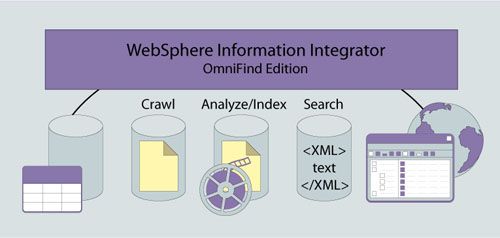
A crawler retrieves information from a source and passes it
to the analyzer, which breaks it down into tokens or strings.
These tokens are then passed to the indexer for processing.
A crawler can get information from many sources. A Web
crawler, for example, will traverse an intranet infrastructure
and index all URLs and related pages and content. A document
crawler can traverse a centralized library containing
documents such as corporate policies, vendor contracts, or
technical program documentation.
Although the time it takes to crawl a source initially can
be lengthy, subsequent updates will be considerably shorter as
the crawler will only look at new or changed documents.
Currently, OmniFind can crawl the following sources: IBM
DB2 Content Manager item types (documents, resources, and
items), DB2 databases, federated databases (Oracle, Informix,
Sybase, and SQL Server), Lotus Notes, Microsoft Exchange
Server public folders, Microsoft Windows file systems, Network
news transfer protocol (NNTP) newsgroups, Unix file systems,
Venetica repositories, and Internet or intranet sites. An API
is available to extend the crawler to other sources.
Each crawler has a set of rules or properties that govern
its crawling behavior and resource utilization. You can limit
the reach of the Web crawler, for example, by using filters
such as domain (*.ml.com), IP ranges (allow 1.0.0.0
255.0.0.0), or URL prefix (*.ml.com/default.htm/*). The Web
crawling interval can be explicitly defined or controlled by
the content modification rate. For example, content that
changes often should be re-crawled sooner than content that
seldom changes. These options, and the specific options for
the other crawlers, let you throttle the crawler to ensure
that it collects the desired information without consuming too
much network bandwidth.
Once the information is acquired, parsed, and indexed, the
search engine can perform sophisticated linguistic searching.
The linguistic search engine understands the root form of
words (such as drive, driven, drove), the singular and plural
forms of nouns (calf and calves), and words that have a
similar meaning (go, goes, went, gone, and going). These
linguistic capabilities improve the accuracy and flexibility
of the search results. (See the manual Administering
Enterprise Search, available at ftp.software.ibm.com/software/db2ii_om/info/v_82/iiysa_en_US.pdf),
for a more detailed discussion of OmniFind search algorithms.
To search across data sources with a single request, the
sources must be grouped into collections. A
collection is an OmniFind concept that links together
disparate data sources that have been collected, analyzed, and
indexed into a searchable index. Documents can be categorized
into groups using rule- or model-based categorization
techniques to enhance and refine search requests and results.
Various OmniFind mechanisms control access to the collected
information. User authentication can be controlled at the
WebSphere Application Server layer or the search collection
layer. Security tokens can be associated with documents as
they're indexed. The associated tokens can be used at the
WebSphere Application Server layer to provide more granular
security access.
Practical Uses
Most large companies use a multitude of content management
systems. This multiproduct strategy wasn't planned but evolved
from independent business unit decisions, mergers and
acquisitions, and so on. Owning and managing these products is
expensive and time consuming. This multiproduct approach also
presents a fractured view of information available to the
client. OmniFind repairs this fractured view by masking the
idiosyncrasies and complexity of various content management
products, and providing a unified interface that hides the
plumbing behind it.
An enterprise search engine can also help with combining
the unstructured or free-form content in database columns with
complementary content external to the database. Heterogeneous
databases at a given company often contain critical
unstructured data attributes, such as problem logs or product
descriptions. In most cases, the attributes aren't indexed.
Searches are typically accomplished using the SQL
LIKE function and are limited to the data in the
database-unstructured sources can't be collected and added
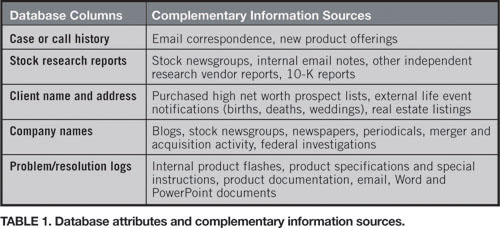
easily. Combining the information in the database with
unstructured content in other systems via OmniFind creates a
searchable source that enhances the value of a company's
information. Table 1 shows a list of database attributes and
potential sources of complementary information.
For example, using OmniFind, a representative at an
automotive company's call center could search a database call
history column, email, and other correspondence for the phrase
"bad driving experience." The typical database text search
function can't search nonrelational sources with a single
query and lacks sophisticated linguistic capabilities.
Overlooking information sources can result in missing
opportunities to serve a customer or spot trends affecting all
customers.
Auditing and compliance presents another opportunity to
leverage OmniFind enterprise search capabilities. Corporate
documents, email, newsgroups, and other written communications
can be searched for violations of company policies or federal
laws.
Finding the Needle
OmniFind adds an important component to an EII strategy. It
allows companies to gain insights into unstructured data
content previously locked up in proprietary formats that were
difficult to search and retrieve. WebSphere Information
Integrator and OmniFind let you liberate the data and make
users as comfortable searching company data as they are
searching the Internet.
Howard Goldberg
is a vice president at Merrill Lynch, a leading financial
firm, and a member of IBM's Information Integration Leadership
Board.
Resources
OmniFind
"Unleashing
the Power of Data," Quarter 2, 2004
WebSphere Information Integrator
Comments? Questions?
Give us your feedback or ask a question of the author.